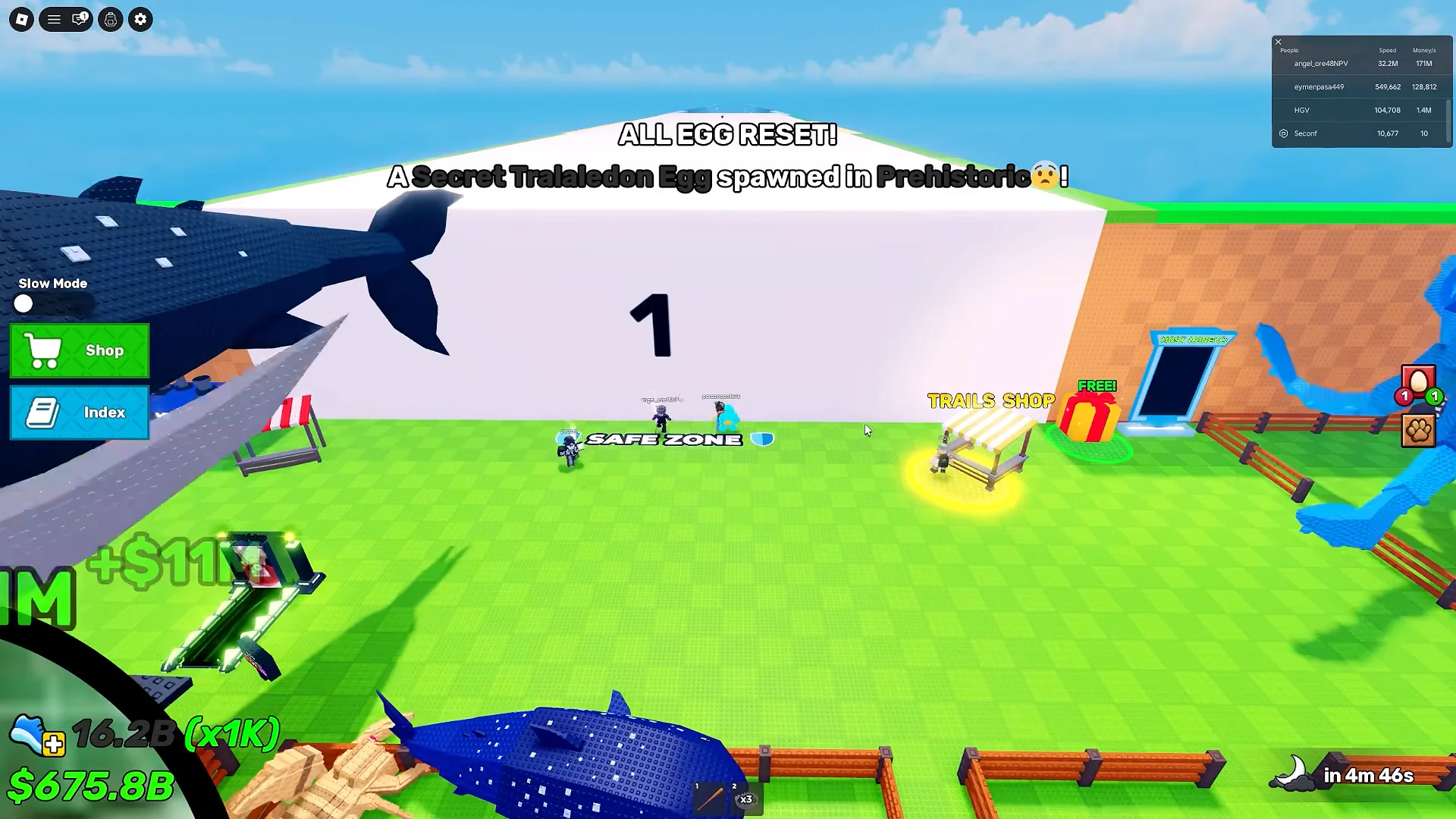
To measure: choose one server label and one visible cue, record it when it appears, then record the same cue again. Two timestamps give your first interval; keep recording to check whether it repeats. Use a new label if you change servers.
ONE OBSERVED INTERVAL
Predict the next local-time window
Your data only
Pick one visible event, enter when you last saw it and the interval you measured. The calculator advances that interval and never assumes a universal server timer.
Measured interval
Advanced variation range
Countdown to predicted center—:—
Waiting for your measurements. Use the time of a cue you actually saw and a measured interval. If you do not have an interval yet, choose Record cues above; no interval is assumed.
Recent prediction checks
No prediction checks saved on this device yet.
Try a historical example — not a current-server interval
Historical event example
Five intervals from one Admin Abuse/update recording, reviewed August 31, 2026: median 5:00, observed variation ±7 seconds. This example is not a verified interval for your current ordinary server. Audit six timestamps →
Which visible cue should I record?
This gameplay frame provides readable All Egg Reset and Secret Tralaledon cues. It proves the cues occurred, not a universal interval.
Spawn, reset, next egg and hatch time are different
Time the same visible cue throughout a session. Do not combine reset notices, shop refreshes and hatch timers in one set of observations.
Term
What to observe
What this tool can tell you
Spawn
A matching egg or event appearing in the server
A timing estimate from repeated observations, not a universal spawn schedule
Reset
The visible All Egg Reset notice
The interval between consecutive matching reset cues; not a guaranteed specific egg
Next egg
The specific egg or rarity that may appear
Unknown: the tool has no live server-state feed
Hatch time
The timer on an egg already placed in a pen
Not a spawn interval; read that egg’s in-game hatch timer separately
WORKED LOCAL-TIME EXAMPLE
Reset seen at 12:34:00 + 5:00 ± 7 seconds
Earliest12:38:53Center12:39:00Latest12:39:07
The first center is the observation time plus one interval; the bounds subtract and add your variation. Quick Prediction advances by whole intervals when a center is already in the past. This example uses the historical event sample below to illustrate arithmetic, not a universal server schedule.
Check the result in game: record the next matching cue in the result panel. A countdown reaching zero does not prove that an egg appeared. No observation means no verified result.
Measure a usable interval in your current server
Choose one cue and label the session. In Observation Lab, select the event you can actually see and enter a server or test label.
Record consecutive cues. Press Record reset now whenever that same cue appears. Two timestamps give one interval; more observations let you compare the range and median.
Check the gaps before using a median. A missed cue, server hop or different event can distort the result. Keep sessions separate and use Undo latest for an accidental entry.
Use and verify the estimate. Enter a measured interval in Quick Prediction, or use the lab’s median countdown. Re-check against the next visible cue; no sample count guarantees a future spawn.
Keep the evidence. Export CSV to preserve timestamps and the session label. The tool displays your device’s local time; CSV timestamps are exported in UTC.
Planning a run? After calculating a window, enter your Measured full route and safety buffer in the departure panel. It shows Start moving in, leave-by time, arrival if you leave now and Slack before latest. This compares your inputs; it cannot guarantee a safe route or an egg.
Timing evidence and its limits
5 consecutive intervals · median 5:00
One historical Bùm Admin Abuse/update livestream contains 5:00, 5:00, 5:07, 4:53, 5:00. Its 4:53–5:07 range describes that uninterrupted event-server window only, not ordinary-server timing. The recording was reviewed on August 31, 2026; this page’s review date does not make it current gameplay evidence.
The official Roblox game page describes the game loop but does not publish a fixed spawn or reset interval. The spawn evidence ledger keeps the six source timestamps and coverage limits.
It estimates the next local-time window from a matching cue you observed and an interval you measured in the same server. It does not connect to Roblox or predict the identity, rarity or hatch outcome of the next egg.
How do I start if I do not know the reset interval?
Open Observation Lab, choose the visible event and a server label, then press Record reset now at two consecutive matching cues. The lab calculates the elapsed interval. Keep recording to compare the minimum, median and maximum; a single interval is only an early estimate.
Is the Steal An Egg spawn time always five minutes?
A universal spawn interval is not established. One historical Admin Abuse/update server recording contains five measured intervals from 4:53 to 5:07, with a 5:00 median. That event sample does not establish ordinary-server timing. Measure your current server instead of treating the sample as a game rule.
What should I do if the predicted window is wrong?
Check that you stayed in the same server and timed the same type of cue. In Quick Prediction, record whether the matching cue arrived inside the window, early, late, or was not seen. Re-sync with your next observation. After a restart, update or server change, use a new observation label rather than mixing sessions.
Is this a live stock schedule or Discord predictor?
No. A posted stock forecast names an egg and a future time; this tool only projects a time from your observations. It has no Discord bot or live server feed. Neither a reset countdown nor an old community forecast proves which egg will appear.
Will my observations be saved?
Observation Lab stores records in this browser and can export or import CSV. Export before clearing browser data or changing devices. Optional cross-device backup encrypts the tool snapshot in your browser before upload; keep your private sync key safe.
For a posted forecast, check the original date, timezone, target and matching gameplay outcome using the stock forecast audit checklist. Unverified outcomes remain unknown.
OPTIONAL CROSS-DEVICE BACKUP
Reuse observations, timers and presets on another device
Your browser encrypts the tool snapshot before upload. The server stores ciphertext and never receives the sync key.
Not connected
Keep the key private. There is no account recovery. Losing the key loses access; sharing it gives the recipient control of this encrypted backup.